
If you run Facebook or Instagram ads to a WordPress site, the Meta Conversions API on WordPress is one of the most valuable things you can set up this year. Browser tracking on its own now misses a real share of conversions, and when Meta cannot see your results, it cannot optimize your campaigns. In this guide I will explain what the Conversions API (CAPI) is, why it matters, and three practical ways to set it up on WordPress, from a simple plugin to an n8n automation.
Meta Pixel vs Conversions API: what is the difference?
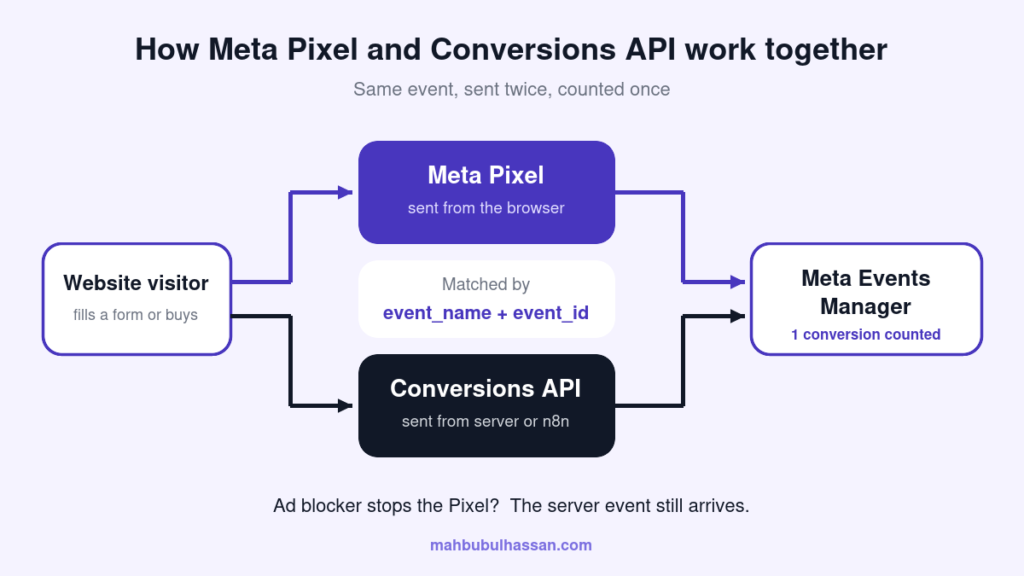
The Meta Pixel is a piece of JavaScript that runs in your visitor’s browser. When someone views a page, submits a form or buys something, the Pixel sends that event to Meta.
The Conversions API sends the same events from your server straight to Meta. Because it does not depend on the browser, it keeps working when the Pixel is blocked or limited.
| Meta Pixel (browser) | Conversions API (server) | |
|---|---|---|
| Where it runs | Visitor’s browser | Your server or an automation tool |
| Affected by ad blockers | Yes | No |
| Affected by browser privacy limits | Yes | Much less |
| Can send offline or CRM events | No | Yes |
| Setup difficulty | Easy | Moderate |
The best setup is not one or the other. Meta recommends a redundant setup: send every important event through both the Pixel and the Conversions API, then let Meta remove the duplicates.
Why the Conversions API matters for your ads
- More complete data. Ad blockers, privacy-focused browsers and cookie limits stop many Pixel events from reaching Meta. Server events fill those gaps.
- Better ad optimization. Meta’s delivery system learns from conversions. More accurate conversion data usually means it finds better buyers and leads for the same budget.
- Lower reported cost per result. When conversions that were happening anyway are finally counted, your real cost per lead or purchase becomes visible.
- Events beyond the website. You can send leads that convert later in your CRM, phone sales or WhatsApp orders back to Meta.
Before you start: a quick checklist
- A Meta Business account with admin access to your Pixel (now called a dataset in Events Manager).
- Your domain verified in Meta Business settings.
- Admin access to your WordPress site.
- A clear list of the events you care about, for example
PageView,Lead,Contact,AddToCart,InitiateCheckoutandPurchase. - A cookie consent setup that respects your visitors’ choices and the privacy laws that apply to your audience.
3 ways to set up the Meta Conversions API on WordPress
Option 1: Use a plugin (fastest)
Meta offers an official integration for WordPress and WooCommerce, and several trusted tracking plugins also support the Conversions API. You connect your Meta account, choose your Pixel, and the plugin sends browser and server events for you, usually with deduplication handled automatically.
Best for: small business sites and WooCommerce stores that need a working setup quickly.
Downside: less control over which events and customer details are sent, and one more plugin to keep updated.
Option 2: Google Tag Manager server-side (most control)
With a server-side Google Tag Manager container, your website sends events to your own tagging server, which then forwards them to Meta, GA4 and other platforms. This is the setup I recommend for businesses spending seriously on ads, because one clean data stream feeds every platform.
Best for: growing brands, high ad budgets and sites that also need accurate GA4 tracking.
Downside: needs hosting for the server container and more technical setup.
Option 3: n8n automation (great for leads)
If most of your conversions are form submissions or WhatsApp and Messenger leads, an n8n automation is a flexible option. The flow looks like this:
- A visitor submits a form on your WordPress site (Contact Form 7, Elementor Forms, WPForms and so on).
- The form sends the data to an n8n webhook, together with the
event_idused by the Pixel and the_fbpand_fbccookie values. - n8n hashes the email and phone number with SHA-256.
- An HTTP Request node posts the
Leadevent to the Conversions API. - The same workflow can also add the lead to your CRM, Google Sheet or send a WhatsApp alert to your sales team.
Here is a simplified example of the event body n8n sends:
{
  "data": [{
    "event_name": "Lead",
    "event_time": 1760200000,
    "event_id": "lead-8f3a21c9",
    "action_source": "website",
    "event_source_url": "https://example.com/contact/",
    "user_data": {
      "em": ["<sha256 of lowercase email>"],
      "ph": ["<sha256 of phone with country code>"],
      "fbp": "fb.1.1760199000.123456789",
      "client_ip_address": "203.0.113.10",
      "client_user_agent": "Mozilla/5.0 ..."
    }
  }]
}
Best for: service businesses and lead generation campaigns.
Downside: you need an n8n instance and some care with data handling.
Step-by-step: the core setup that every method needs
Step 1: Generate a Conversions API access token
In Meta Events Manager, open your Pixel, go to Settings, find the Conversions API section and generate an access token. Store it somewhere safe. Never paste it into front-end code or a public file.
Step 2: Use the same event_id on the browser and the server
This is the step most setups get wrong. Meta removes duplicates by matching the event_name and event_id of the browser event and the server event. Generate one ID when the action happens, send it with the Pixel (fbq('track', 'Lead', {}, {eventID: id})) and send the exact same value with the server event. If the IDs differ, every conversion is counted twice.
Step 3: Send good customer information
Meta matches server events to people using customer information parameters. The more good quality details you send, the higher your Event Match Quality score (rated out of 10). Useful parameters include:
- Email and phone number, normalized and hashed with SHA-256
- First name, last name, city and country (hashed)
- The
_fbpand_fbccookie values - The visitor’s IP address and user agent (not hashed)
- An
external_idsuch as your customer or lead ID
Step 4: Test before you go live
Open the Test Events tab in Events Manager, copy the test code into your plugin, server container or n8n workflow, and trigger each event on your site. You should see each event arrive from both Browser and Server, marked as deduplicated. Remove the test code once everything works.
Step 5: Monitor for the first two weeks
Check the Overview and Diagnostics tabs in Events Manager. Watch for warnings about missing parameters or duplicate events, and compare the conversion count in Ads Manager with the real number of leads or orders in WordPress.
Common mistakes to avoid
- Different event IDs on browser and server. Conversions double and your cost per result looks better than it really is.
- Event name mismatch. “Lead” on the Pixel and “lead_submit” on the server will not deduplicate.
- Hashing the wrong values. Trim spaces and lowercase emails before hashing. Do not hash IP address, user agent or the fbp and fbc values.
- Sending events without consent. Respect your cookie banner choices on both the browser and the server.
- Forgetting caching. Page caching plugins can serve the same event ID to many visitors. Generate IDs in JavaScript or exclude dynamic parts from the cache.
Frequently asked questions
Do I still need the Meta Pixel if I use the Conversions API?
Yes, in most cases. Meta recommends running both together. The Pixel captures browser context, the Conversions API fills the gaps, and deduplication makes sure each conversion is counted once.
Is the Meta Conversions API free?
Meta does not charge for the API itself. Your costs come from the tools around it, such as a premium plugin, a server-side tagging host or an n8n server.
Will the Conversions API slow down my WordPress site?
Not if it is set up well. Server-side and n8n setups move work away from the visitor’s browser, which can even help page speed compared with loading many tracking scripts.
Which events should a service business send?
Start with PageView, ViewContent on your service pages, Lead for form submissions and Contact for WhatsApp, phone or Messenger clicks. Add Schedule if you take bookings.
Final thoughts
Setting up the Meta Conversions API on WordPress is no longer a nice extra. It is the foundation of reliable Facebook ad results. Start with the method that fits your site today, make sure your event IDs match, and test every event before you spend more on ads.
Need help connecting your WordPress site, Meta Pixel, Conversions API and n8n into one tracking system? Take a look at my services or get in touch and I will help you set it up the right way.